


[php] 안드로이드 웹뷰 정리 2026-02-23
본문
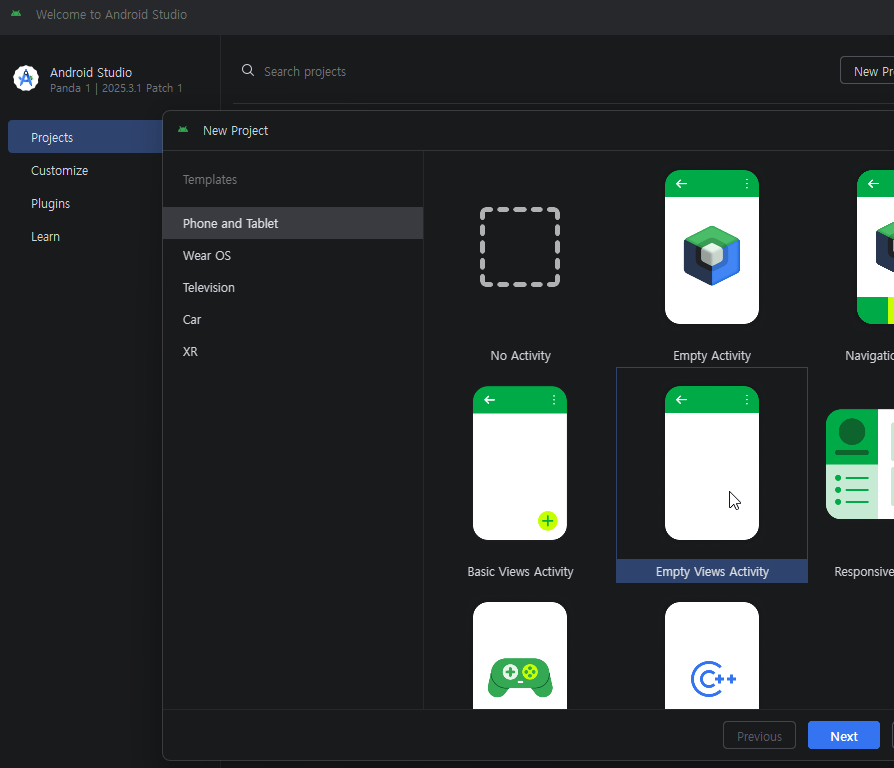
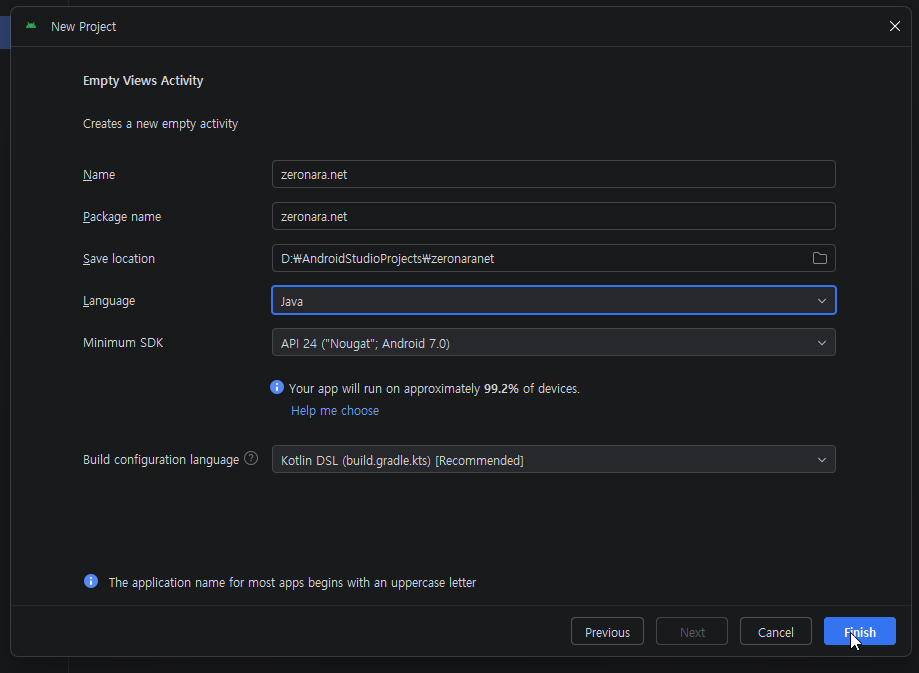
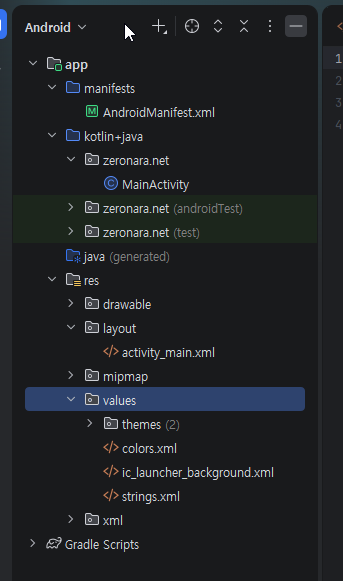
manifests/AndroidManifest.xml
<?xml version="1.0" encoding="utf-8"?>
<manifest xmlns:android="http://schemas.android.com/apk/res/android"
    xmlns:tools="http://schemas.android.com/tools">

    <uses-permission android:name="android.permission.INTERNET" />

    <application
        android:allowBackup="true"
        android:dataExtractionRules="@xml/data_extraction_rules"
        android:fullBackupContent="@xml/backup_rules"
        android:icon="@mipmap/ic_launcher"
        android:label="@string/app_name"
        android:roundIcon="@mipmap/ic_launcher_round"
        android:supportsRtl="true"
        android:theme="@style/Theme.AppCompat.Light.NoActionBar"
        android:usesCleartextTraffic="true">
        <activity
            android:name=".MainActivity"
            android:exported="true">
            <intent-filter>
                <action android:name="android.intent.action.MAIN" />

                <category android:name="android.intent.category.LAUNCHER" />
            </intent-filter>
        </activity>
    </application>

</manifest>
kotlin+java/zeronara.net/MainActivity.java
package zeronara.net;

import android.content.ActivityNotFoundException;
import android.content.Intent;
import android.net.Uri;
import android.os.Bundle;
import android.view.Window;
import android.webkit.SslErrorHandler;
import android.webkit.WebChromeClient;
import android.webkit.WebResourceError;
import android.webkit.WebResourceRequest;
import android.webkit.WebSettings;
import android.webkit.WebView;
import android.webkit.WebViewClient;
import android.net.http.SslError;

import androidx.appcompat.app.AppCompatActivity;

public class MainActivity extends AppCompatActivity {
    public WebView webView;

    @Override
    protected void onCreate(Bundle savedInstanceState) {
        super.onCreate(savedInstanceState);
        requestWindowFeature(Window.FEATURE_NO_TITLE);
        setContentView(R.layout.activity_main);

        webView = (WebView) findViewById(R.id.webView);
        WebSettings webSettings = webView.getSettings();

        webSettings.setJavaScriptEnabled(true);
        webSettings.setDomStorageEnabled(true);
        webSettings.setUseWideViewPort(true);
        webSettings.setLoadWithOverviewMode(true);
        webSettings.setCacheMode(WebSettings.LOAD_DEFAULT);

        // User-Agent
        String defaultUA = webSettings.getUserAgentString();
        webSettings.setUserAgentString(defaultUA + " zeronaraApp/1.0 (Android)");

        webView.setWebViewClient(new WebViewClient() {

            @Override
            public boolean shouldOverrideUrlLoading(WebView view, WebResourceRequest request) {
                String url = request.getUrl().toString();

                // 구글 플레이스토어 링크 처리
                if (url.startsWith("market://") || url.contains("play.google.com/store")) {
                    try {
                        Intent intent = new Intent(Intent.ACTION_VIEW, Uri.parse(url));
                        startActivity(intent);
                    } catch (ActivityNotFoundException e) {
                        // 플레이스토어 앱이 없으면 브라우저로 폴백
                        String fallbackUrl = url.replace("market://", "https://play.google.com/store/apps/");
                        startActivity(new Intent(Intent.ACTION_VIEW, Uri.parse(fallbackUrl)));
                    }
                    return true;
                }

                // 외부 브라우저로 열어야 할 스킴 처리 (tel, mailto 등)
                if (url.startsWith("tel:") || url.startsWith("mailto:") || url.startsWith("intent:")) {
                    try {
                        startActivity(new Intent(Intent.ACTION_VIEW, Uri.parse(url)));
                    } catch (ActivityNotFoundException e) {
                        e.printStackTrace();
                    }
                    return true;
                }

                return false; // 그 외 URL은 웹뷰에서 처리
            }

            @Override
            public void onPageFinished(WebView view, String url) {
                super.onPageFinished(view, url);
            }

            @Override
            public void onReceivedError(WebView view, WebResourceRequest request, WebResourceError error) {
                super.onReceivedError(view, request, error);
            }

            @Override
            public void onReceivedSslError(WebView view, SslErrorHandler handler, SslError error) {
                handler.proceed();
            }
        });

        webView.setWebChromeClient(new WebChromeClient() {
            @Override
            public void onReceivedTitle(WebView view, String title) {
                super.onReceivedTitle(view, title);
            }
        });

        webView.loadUrl("https://zeronara.net");
    }

    @Override
    public void onBackPressed() {
        if (webView.canGoBack()) {
            webView.goBack();
        } else {
            getOnBackPressedDispatcher().onBackPressed();
        }
    }

    @Override
    protected void onPause() {
        super.onPause();
        webView.onPause();
    }

    @Override
    protected void onResume() {
        super.onResume();
        webView.onResume();
    }

    @Override
    protected void onDestroy() {
        super.onDestroy();
        webView.destroy();
    }
}
res/layout/activity_main.xml
<?xml version="1.0" encoding="utf-8"?>
<androidx.constraintlayout.widget.ConstraintLayout xmlns:android="http://schemas.android.com/apk/res/android"
    xmlns:app="http://schemas.android.com/apk/res-auto"
    xmlns:tools="http://schemas.android.com/tools"
    android:id="@+id/main"
    android:layout_width="match_parent"
    android:layout_height="match_parent"
    tools:context=".MainActivity">

    <WebView
        android:id="@+id/webView"
        android:layout_width="match_parent"
        android:layout_height="match_parent" />

</androidx.constraintlayout.widget.ConstraintLayout>
res/values/strings.xml
<resources>
    <string name="app_name">ZERONARA</string>
</resources>
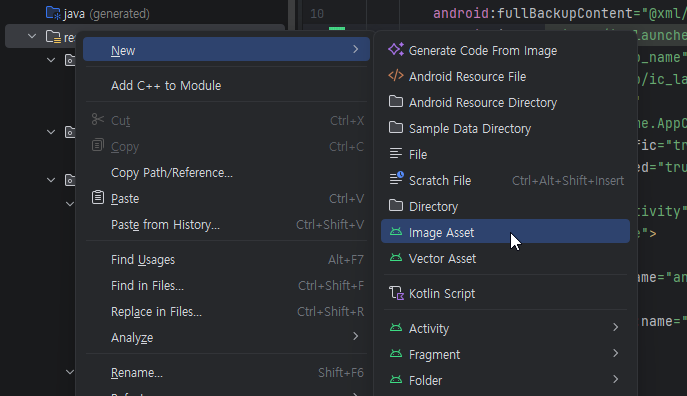
아이콘 생성
***.png준비 640*640
댓글목록 0
등록된 댓글이 없습니다.

